kernel log
1 | # check |
check log level
1 | # See current values: console_loglevel default_message_loglevel ... |
/proc/sys/kernel/printk controls the Linux kernel’s printk() logging thresholds—primarily which kernel messages are emitted to the console. It does not control whether messages are retained in the kernel log buffer, which you can inspect with dmesg.[1]
For this value:
1 | 4 4 1 7 |
the four integers mean:
| Position | Name | Value | Effect |
|---|---|---|---|
| 1 | console_loglevel |
4 | Console displays messages with priority numerically less than 4: KERN_EMERG (0) through KERN_ERR (3). Warnings (4) and below are not newly printed to the console. |
| 2 | default_message_loglevel |
4 | Default priority for kernel messages that omit an explicit log-level prefix: KERN_WARNING (4). |
| 3 | minimum_console_loglevel |
1 | Lowest console threshold allowed; protects against setting the console level below emergencies. |
| 4 | default_console_loglevel |
7 | Console log level used at boot/default reset: priorities 0–6, up to KERN_INFO. |
Linux log priorities, from most to least severe, are:
1 | 0 emerg System unusable |
To change the current console verbosity temporarily:
1 | # Print errors and more severe messages only |
Equivalently, writing the first value changes only the active console threshold:
1 | echo 7 | sudo tee /proc/sys/kernel/printk |
Verify config
1 | sysctl kernel.printk |
Restore the prior console threshold when finished
1 | sudo dmesg -n 4 |
process
/proc/<PID>/is the kernel’s live view into a running process. All entries are virtual files generated on-the-fly by the kernel; they cost no disk space and always reflect current state.
Identity & Command
| Entry | Content | Example use |
|---|---|---|
cmdline |
Full command line, args separated by \0 |
tr '\0' ' ' < /proc/1234/cmdline |
comm |
Command name only (max 15 chars) | Quick identification |
exe |
Symlink to the actual binary | readlink /proc/1234/exe — shows real path even if binary was deleted/replaced |
environ |
Initial environment variables, \0-separated |
tr '\0' '\n' < /proc/1234/environ | grep PATH |
pid / ppid |
In status |
Parent-child relationship tracing |
Filesystem & Files
| Entry | Content | Example use |
|---|---|---|
cwd |
Symlink to current working directory | readlink /proc/1234/cwd — shows (deleted) if dir was removed |
root |
Symlink to process’s root directory | Differs from / inside chroot/containers |
fd/ |
Directory of symlinks, one per open file descriptor | ls -l /proc/1234/fd/ — see all open files, sockets, pipes |
fdinfo/ |
Per-FD details (flags, position) | Debug file offset issues |
mounts / mountinfo |
Mount table as seen by this process | Differs across mount namespaces (containers) |
maps |
Memory-mapped regions (libraries, heap, stack) | Which .so files are loaded |
Status & Resource Usage
| Entry | Content | Key fields |
|---|---|---|
status |
Human-readable summary | State, VmRSS (actual RAM), VmSize (virtual), Threads, Uid/Gid, voluntary_ctxt_switches |
stat |
Machine-readable counters | utime/stime (CPU), starttime, nice, processor |
statm |
Memory in pages | size, resident, shared |
io |
I/O counters | read_bytes, write_bytes — actual disk I/O vs rchar/wchar (includes cached) |
limits |
Resource limits (ulimits) | Max open files, max processes |
sched |
Scheduling stats | Context switches, wait times |
Debugging & Advanced
| Entry | Content | Example use |
|---|---|---|
stack |
Kernel stack trace | sudo cat /proc/1234/stack — what syscall it’s blocked in |
wchan |
Kernel function it’s sleeping in | Quick “why is it stuck” check |
syscall |
Current syscall + args | cat /proc/1234/syscall |
task/ |
One subdirectory per thread | Thread-level inspection of all the above |
oom_score / oom_adj |
OOM killer scoring | Why the kernel killed your process |
cgroup |
Cgroup membership | Which container/cgroup it belongs to |
ns/ |
Namespace symlinks | ls -l /proc/1234/ns/ — compare inode numbers to see if two processes share net/mnt/pid namespaces |
net/ |
Network state as seen by this process | Per-namespace view of /proc/net/tcp, etc. |
bd_openers
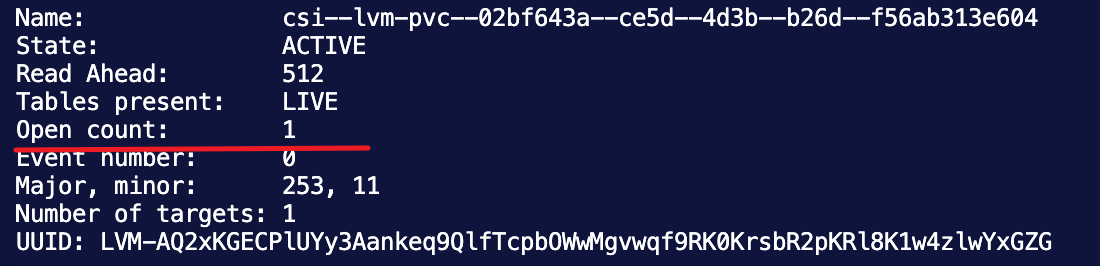
bd_openers (block device openers) is a kernel-level counter inside the struct block_device structure that tracks how many times a block device has been opened — and it’s exactly the number behind the Open count you saw in dmsetup info .
it’s a field in the kernel’s
struct block_device, the in-memory object representing a block device (a disk, a partition, an LV mapping). It counts how many times that device is currently open — a plain integer refcount.
roles
In the Linux kernel, every block device has a struct block_device containing bd_openers. It’s incremented in blkdev_get_by_*() (via bdev_open_by_*() → blkdev_get_whole()) every time someone opens the device, and decremented in bdev_release() / blkdev_put() when the reference is closed:
1 | open(path, O_RDONLY) → bd_openers++ |
What increments it
| Opener | How |
|---|---|
| Mounting a filesystem | mount opens the bdev and holds it for the entire mount’s life |
open("/dev/dm-5") |
any process — dd, mkfs, blkid, lsblk, a database on raw block |
| Stacking a device | dm/md/loop opening it as a lower layer |
swapon |
holds it until swapoff |
| Kernel probes | udev/blkid briefly, on uevents |
This is what dmsetup info surfaces in the Open column
1 | Name Maj Min Stat Open Targ Event UUID |
Why it blocks your removal
dm_lock_for_deletion() refuses to tear down a mapping that something is still using — otherwise the kernel would free structures out from under a live opener and panic. So:
1 | bd_openers != 0 → remove ioctl returns EBUSY |
That’s your Device or resource busy, verbatim. And it explains the three failures you hit:
--force— swaps the table toerrorfirst, then removes. The swap succeeded (hence yourBuffer I/O error on dev dm-5lines); the remove still hit the refcount.--deferred— flags “remove when it reaches zero.” It never reaches zero, so nothing happens.--retry— loops on the same ioctl. Same EBUSY each pass.
None of them decrement the counter. There is no userspace call that does. You can only close the thing holding it open.
so the one opener is a mounted XFS superblock. Normally you’d find its mount in some namespace and unmount it, which releases the reference. But your scans found no mount table entry anywhere and no process holding files on it.
Hence reboot — it’s the only thing that frees kernel memory holding an unreachable reference. Not a workaround; the actual mechanism.
One caveat worth keeping: Open 1 is the kernel’s own accounting and is reliable. But /sys/fs/xfs/dm-5 is keyed by kernel name, not dm UUID — so if a previous device had reused minor 5 and was force-removed while mounted, that kobject could be stale and misattributed. That’d matter if you ever see this error with Open 0. With Open 1 there’s a real opener, so it isn’t your situation.
In short: bd_openers is the kernel’s canonical “is this block device in use” counter; device-mapper consults it before allowing device removal, which is why it directly caused your deactivation failure.
solution
plan 1
plan 2
1 | reboot |
other try
1 | 1. host machine |
nsenter
nsenter (“namespace enter”) is a util-linux tool that runs a program inside the Linux namespaces of another, already-running process — it’s essentially a command-line wrapper around the setns(2) system call.
Linux namespaces partition kernel resources (network, mounts, PIDs, etc.) so processes get isolated views of the system — this is the foundation of containers. nsenter lets you “step into” any of those isolated environments from the host, without attaching to or modifying the container.
dm
command
1 | # See all dm devices and their minor numbers |
tips
- The kernel allocates dm minor numbers sequentially from 0 upward, reusing freed numbers from the lowest available gap. So if dm-7 was removed, minor number 7 becomes available for the next dmsetup create — it doesn’t skip ahead.
D state
1 | # List all D-state processes |